Share what matters.Redact the rest.
Redact screenshots, PDFs and logs offline. Your files are processed on your device, without uploads.
Five free exports. Then US$14.99 once.
No subscription. For Mac, iPhone and iPad.
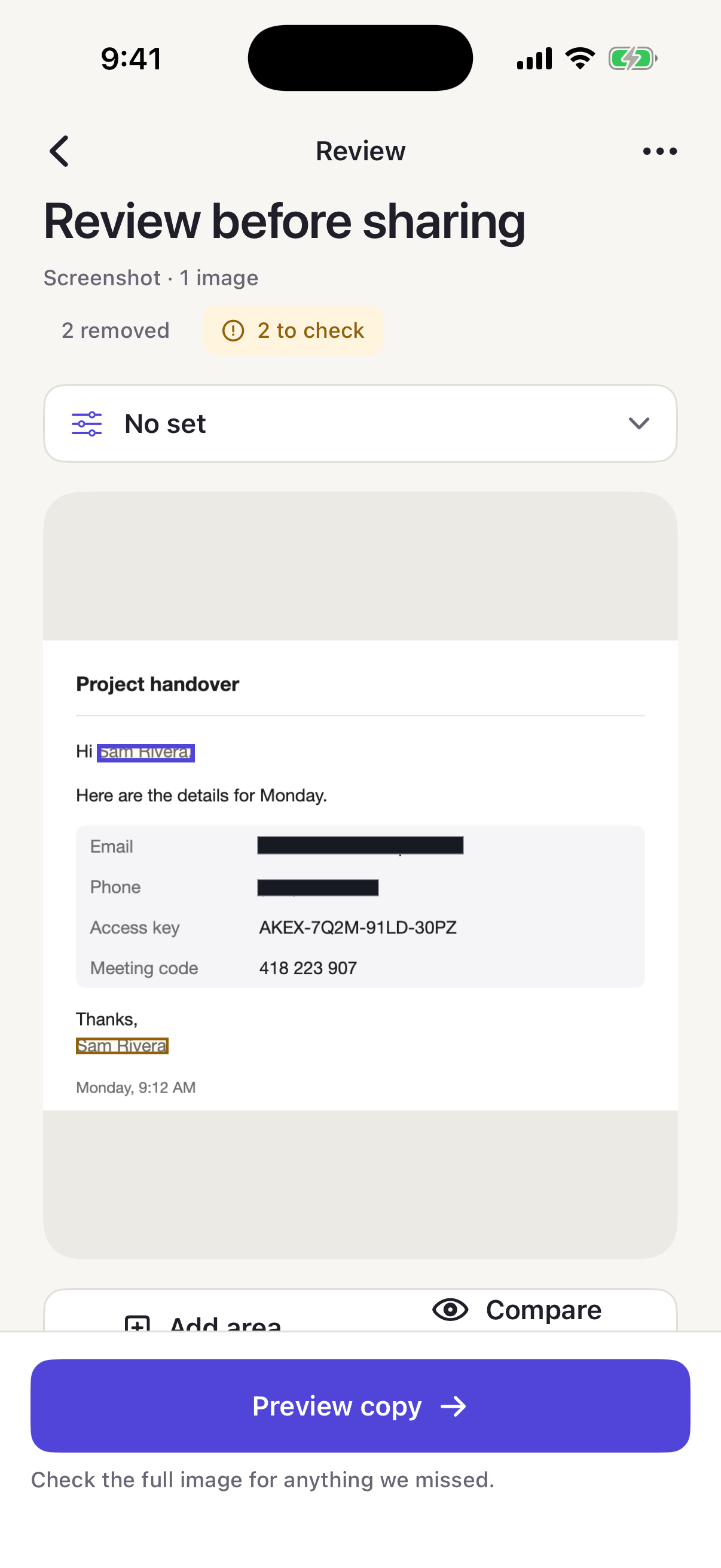
What RedactRoom does
Redact offline.
Processed on your device.
Choose what stays.
Keep the context. Remove the details you choose.
Screenshots, PDFs and logs.
Screenshots, multi-page PDFs and text, in one app.
Questions
Does RedactRoom work offline?
Yes, for redaction. Your files are processed on your device, without uploads.
Purchases and restores are handled by Apple through the App Store and require an internet connection.
Will it find every sensitive detail?
No. Checks can miss sensitive details. Review the source yourself.
Use Add area to cover anything RedactRoom didn’t suggest.
How do the free exports work?
Five free exports on each device. An image or text review uses one free export. A PDF review uses one, regardless of page count. A batch uses one per image.
Failed or cancelled exports don’t count. After your free exports, a one-time purchase of US$14.99 unlocks unlimited exports. No subscription. Reviewing and editing are always available.
Which languages does it check?
Language coverage is limited to English. Review German, Dutch and other languages yourself.
Can I download RedactRoom now?
Not yet. RedactRoom is not yet available on the App Store. The Download button will open the App Store listing once it is live.
More help is on the support page.